Category: Weekly Reflections

Weekly Reflection Blog Post #8

Assisted technology-supported inclusion is all about making learning easier and more accessible for everyone. Universal Design for Learning (UDL) focuses on designing tools and lessons so all students can use them from the start, and many technologies today include helpful features like captions and voice tools, although some can still be confusing to use. Tools like screen readers and text-to-speech are really useful because they help students who have trouble seeing or reading by turning text into audio. Immersive learning like VR and AR also makes learning more engaging by letting students experience things in a more interactive way, which can help them understand better. Overall, these technologies not only improve accessibility but also make learning more interesting, collaborative, and personalized for different students.
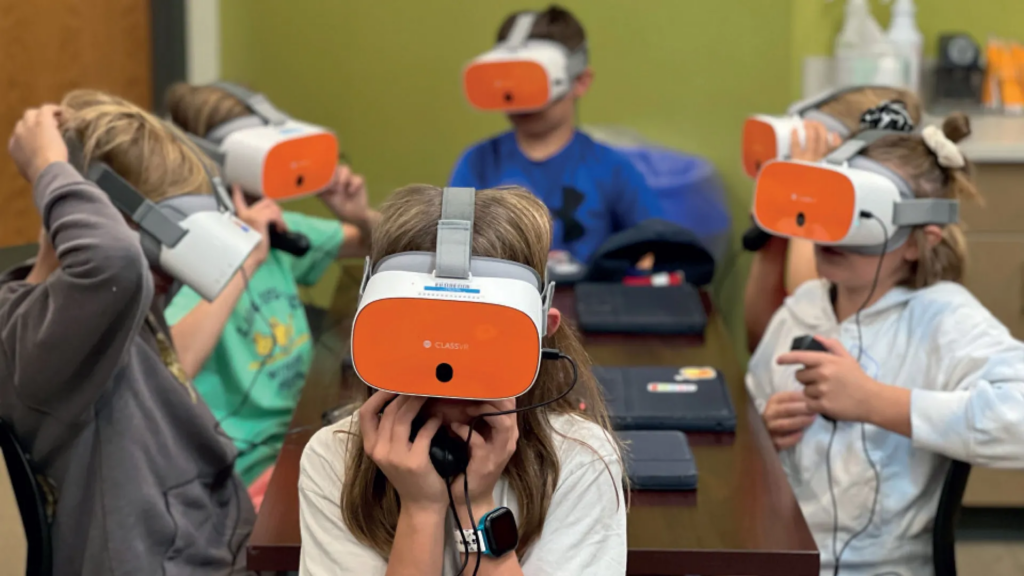
Image from classvr.com

I also looked into specific tools like text-to-speech and adaptive keyboards. Text-to-speech tools read text out loud, which can really help students who struggle with reading or have learning disabilities by making content easier to understand. Adaptive keyboards are designed for people who have difficulty using standard keyboards, with features like larger keys or customized layouts to make typing easier. Both of these tools show how technology can be adjusted to meet different needs and make learning more inclusive for everyone.
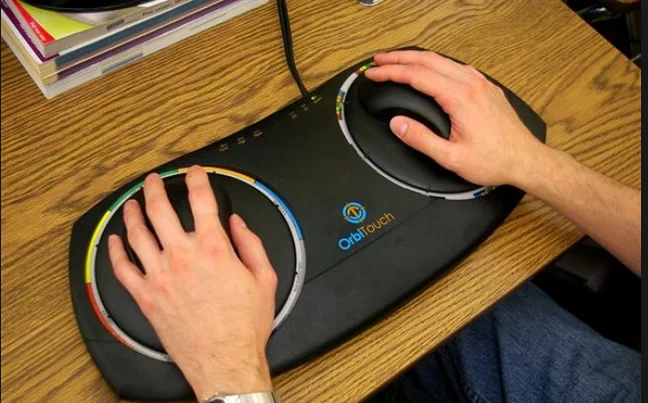
Image from facingdisability.com

The keyboard above is an adaptive keyboard designed to help people with limited mobility use a computer more easily. It has large touchpads and simplified controls, making it easier for users to navigate and interact without needing a traditional keyboard.

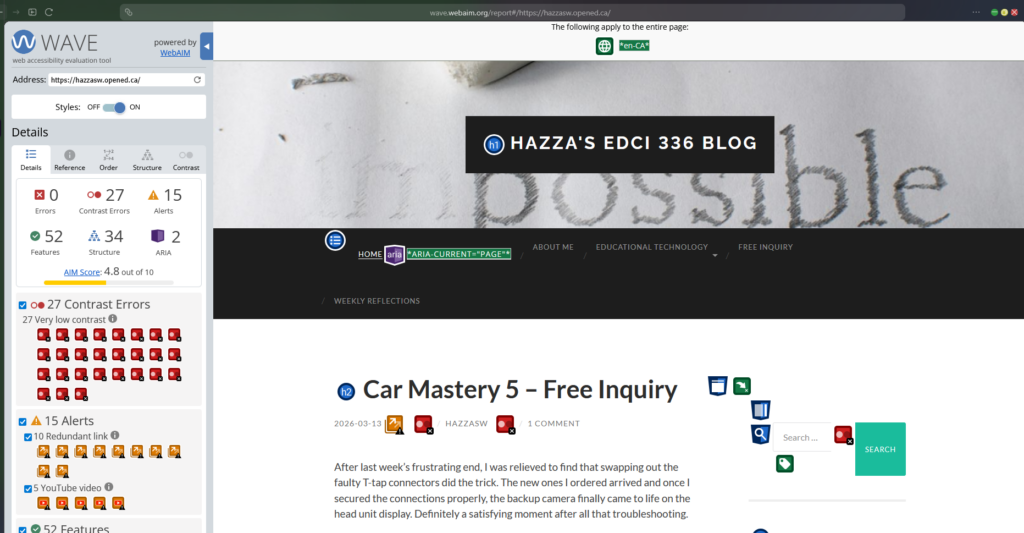
We also talked about web accessibility in class and used the WAVE tool to check how accessible different websites are. I tested my own website and got a score of 4.8, which showed me that while it’s somewhat accessible, there are still improvements I can make to make it better for all users.
Weekly Reflection Blog Post #7

Before this week I hadn’t really thought much about the difference between gamification and actual game-based learning. Turns out there’s more to it than just making something “fun.”

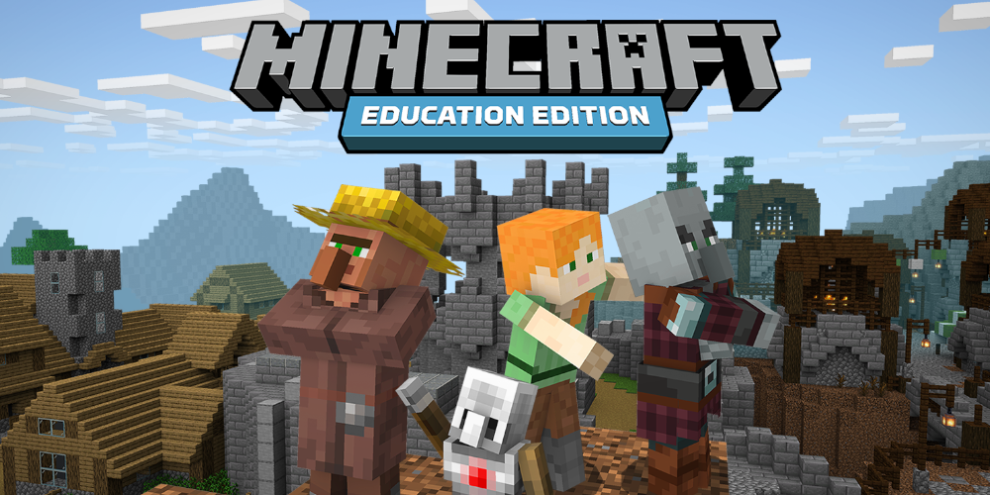
Minecraft Education was a talking point for last class and it’s a good example of game-based learning done right. It’s not just slapping points and badges onto a worksheet as students are actually building, problem solving, and collaborating inside the game itself. The learning is engraved into the experience rather than bolted on top of it. That distinction matters more than I initially realized.

What stuck with me most is that engagement and learning aren’t always the same thing. A student can be fully engaged in a game and still not be retaining much. The best gamified tools seem to be the ones where getting something wrong still leads somewhere useful such as where the game pushes you to try again rather than just cutting you off or punishing you for mistakes.

I wish Minecraft Education was a thing back when I was in grade school as I would have had way more fun in classes with my friends. Instead I remember us hiding tabs in Computer class trying to play Minecraft secretly behind the teachers day. Fun times.

Weekly Reflection Blog Post #6


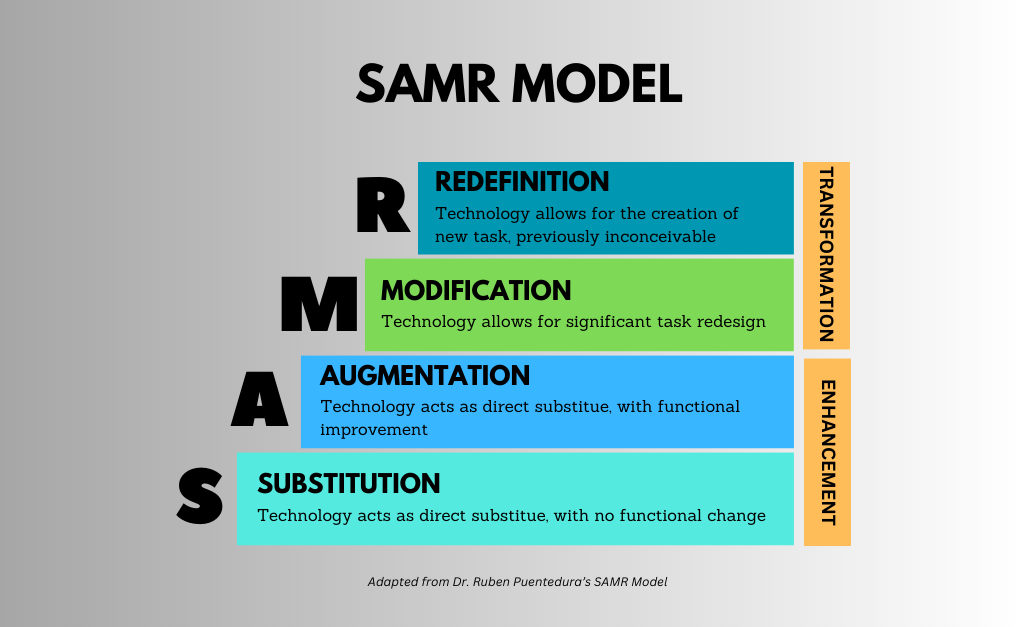
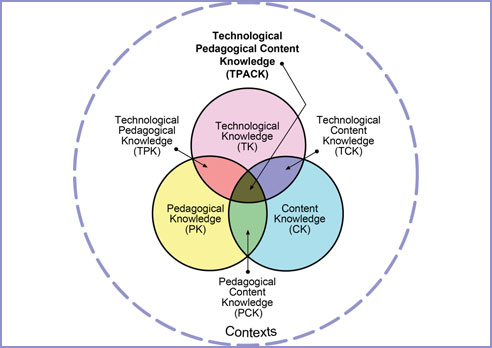
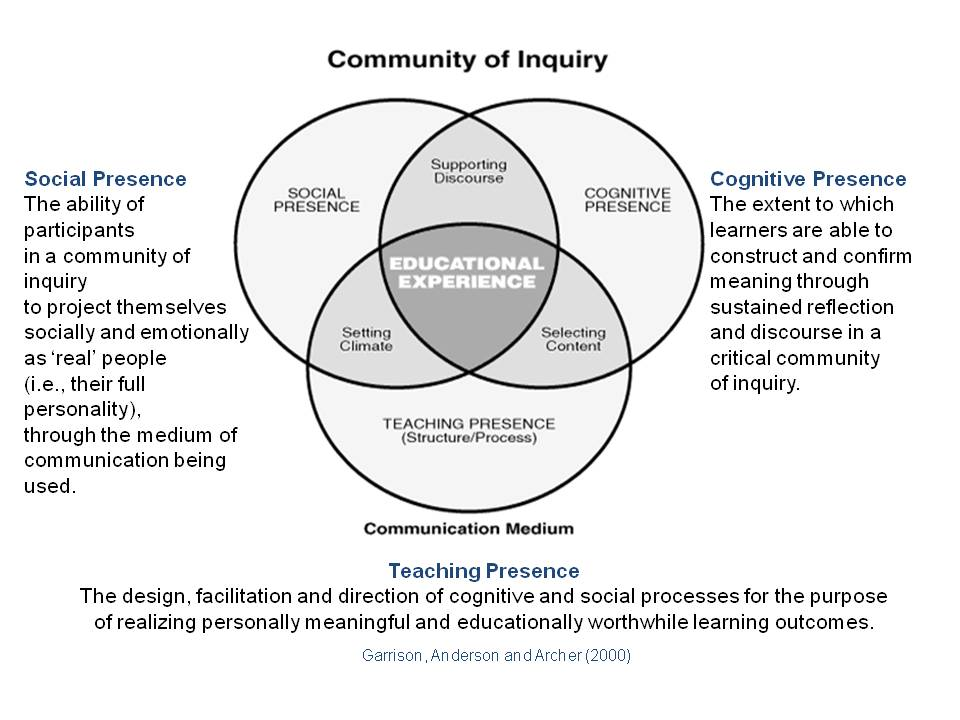
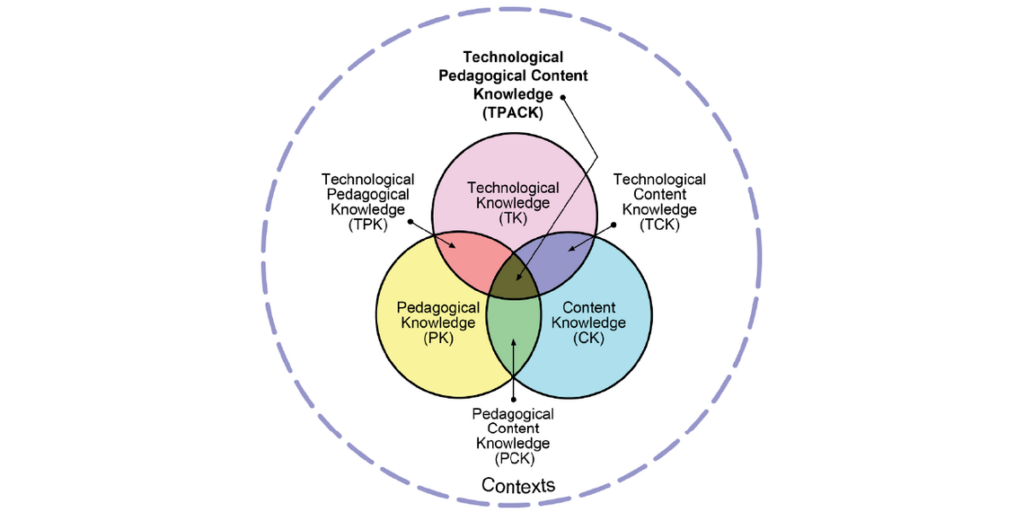
In last class we talked about different educational technology models, including SAMR, TIM, COI, and TPACK framework.

SAMR Model

SAMR is a model that explains how technology can be integrated into learning. It starts with Substitution, where tech simply replaces traditional tools, and moves up to Redefinition, where technology enables completely new learning experiences. The idea is to progress through these levels so technology isn’t just used the same old way but actually enhances learning.


Technology Integration Matrix

TIM is a framework that connects technology use with meaningful learning environments. It looks at how technology supports active learning, collaboration, and student engagement at different levels. Instead of just saying whether tech is used, it evaluates how effectively it improves learning experiences.


Community of Inquiry framework

The Community of Inquiry model focuses on three key ideas: cognitive presence, social presence, and teaching presence. Cognitive presence is about critical thinking, social presence emphasizes collaboration, and teaching presence involves guiding learning. Together, these elements aim to create a learning environment where students engage deeply with ideas and each other.


Technological Pedagogical Content Knowledge framework

TPACK is a model that balances technology, pedagogy, and content knowledge. It explains that effective teaching happens when technology supports learning and fits with good teaching strategies and subject content. The model highlights that all three areas must work together for technology to truly enhance education.


My personal favorite model is probably the SAMR Model because it makes tutoring math easier by using technology such as visualizations and change over time graphs really make understanding math far more easier and does not just limit the subject to symbols and numbers.

Weekly Reflection Blog Post #5

I watched the following workshops listed below for last Friday’s class:

  • Digital Classroom Overview K-12
  • Getting Started with Artificial Intelligence K-12

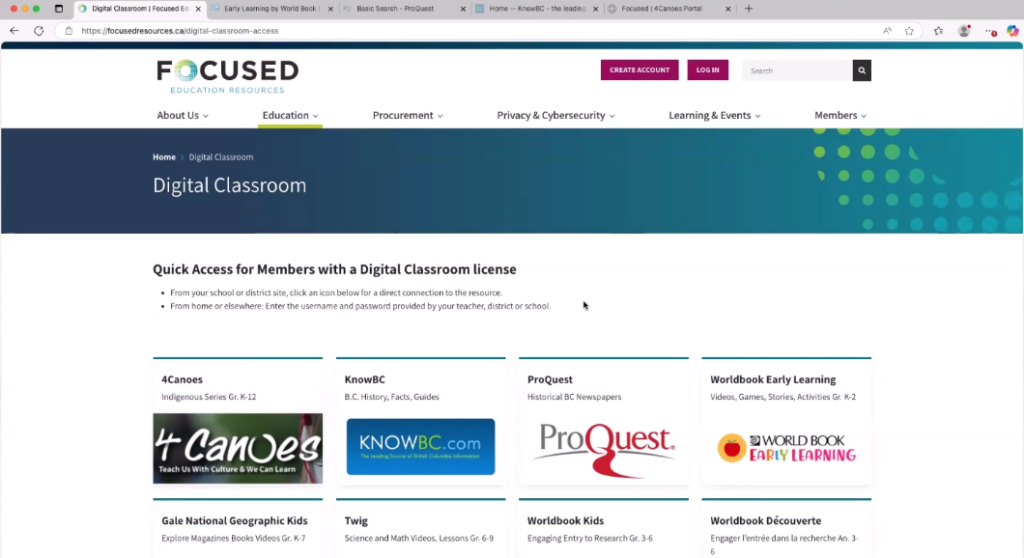
In the Digital Classroom Overview K-12 session, the presenter introduced a variety of online learning resources designed to support teaching across grade levels. I learned how digital textbooks, interactive tools, and multimedia content can be used to engage students and provide flexible learning options. It was also encouraging to see UDL strategies reflected in the resources through features like text-to-speech and adjustable reading levels, supporting accessibility and diverse learning needs in line with the BC Curriculum.

While watching the recorded AI literacy and cybersecurity session, The presenter explained that AI is a tool based on data and probability rather than a search engine, meaning it generates responses instead of pulling fixed answers. She emphasized that results can vary and should be evaluated critically since AI is not always accurate. We also discussed risks like deepfakes and misinformation, and the importance of using AI responsibly and following school guidelines. Overall, the session highlighted both the benefits and limitations of AI in education and the need for digital literacy.


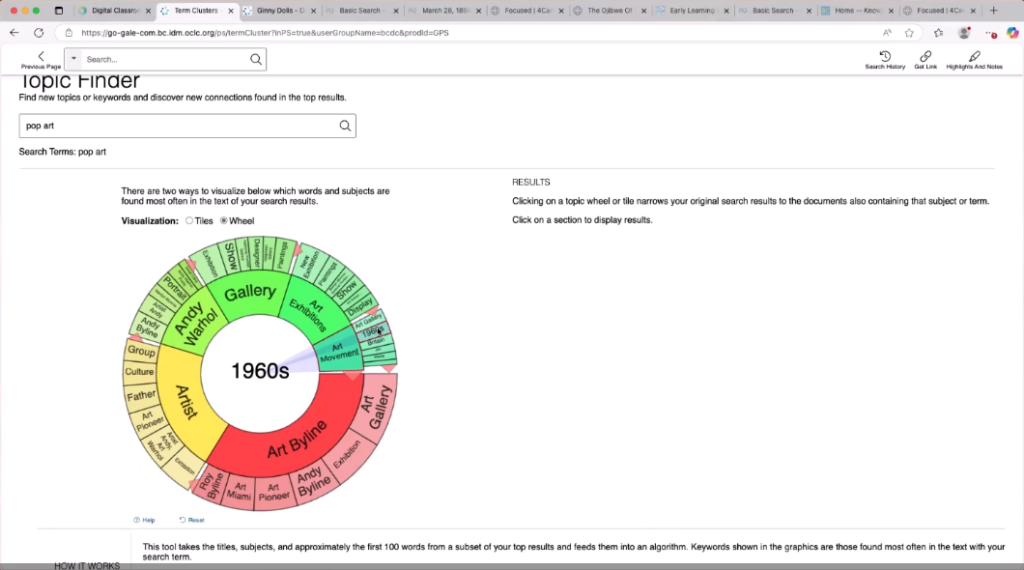
The biggest feature that stood out to me between the two classes was the topic finder in Gale Power Search, especially the wheel visualization. It felt like such a unique way to search for something, allowing me to visually explore related ideas and narrow topics in an intuitive way. This approach seems helpful for brainstorming and discovering resources in a more interactive way compared to traditional search methods. I can see how tools like this would make research more engaging and efficient for students and I wished I had used it during my time in high school.

Weekly Reflection Blog Post #4

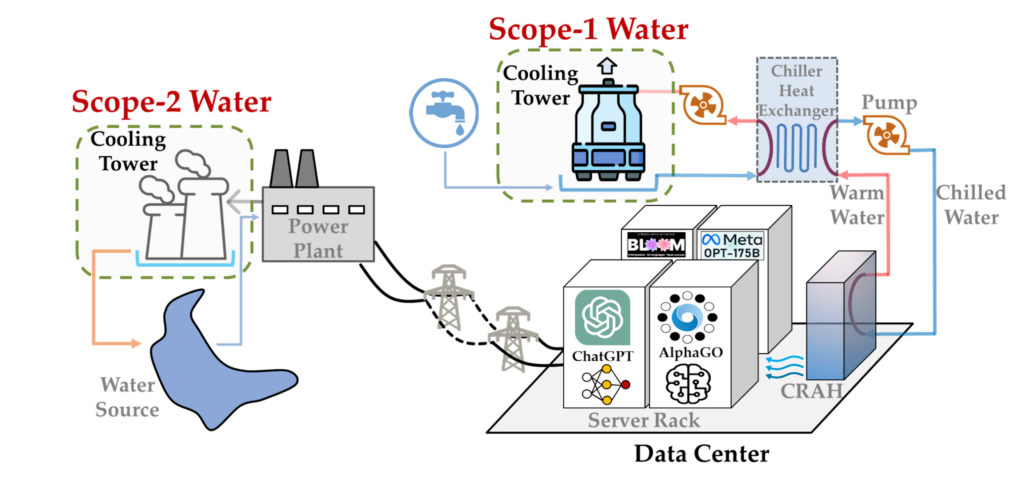
This week’s discussion is focused on the environmental impact of Generative AI, more specifically, the power and water depletion required to run large server farms. While power and water are essential components that are catalysts in fulfilling the world’s digital needs, they sometimes make me question if living near a data center affects the people and communities around it.

To gain a better sense of understanding regarding the discussion and the questions lingering my thoughts, I watched a video that explored the environmental consequences of AI data centres.

The video compelled me to notice that AI and large data centers can actually affect the electricity in the local power grid. The narrator explained that operating thousands of servers simultaneously can cause something called harmonic oscillations within electricity. This means the flow of electricity can get wobbly and fluctuate rather than flow smoothly. These instabilities can make the grid less secure and reliable, and even affect other devices or appliances in nearby homes.

Another rising issue for people living near data centers is noise pollution. As the cooling systems of many servers run constantly, they produce a buzzing sound that is undoubtedly hard to ignore, especially at night. Due to the fact that these facilities run continuously, nearby residents might experience constant background noise which can be frustrating.

One of the biggest and most concerning factors is water consumption. As many data centres rely on water cooling systems to prevent overheating within an intricate network; it leads to them drawing large amounts of water from local supplies, this creates a huge problem for areas dealing with limited water resources that also struggle with putting the water to other uses such as farming and etc.

Overall, I believe that AI is undoubtedly useful and can exceptionally make life and learning easier; however, it comes with underlying depletion like high electricity and water usage. While our generation may not notice these effects as much, future generations could end up paying a much higher price that’s hard to cover.

Weekly Reflection Blog Post #3

AI as a Time-Saver (With Caveats)

Using Gemini to create my lesson plan last week saved a lot of time. What might have taken over an hour took about 15 minutes. But this efficiency only works if we bring our own pedagogical knowledge to the table.

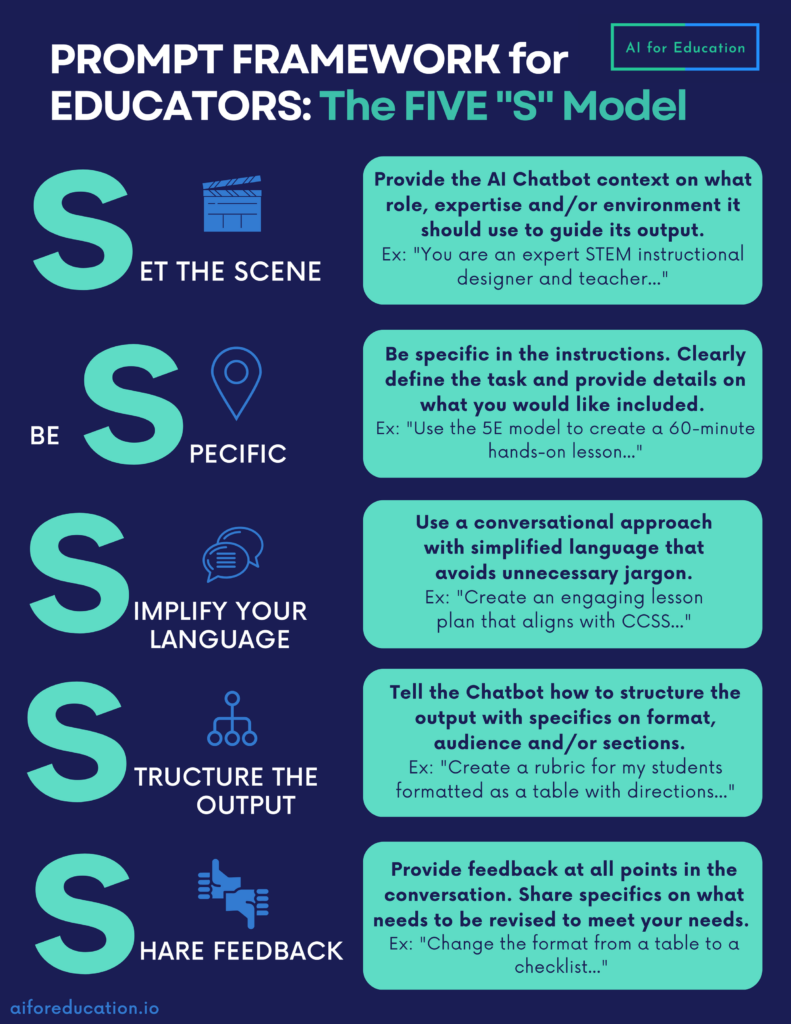
For example, I usually tell AI something like, “act as a grade 12 teacher and create a calculus lesson.” Normally, I don’t spend much time on prompts and just tweak things as I go. However this time, I set out all my goals and expectations at the start as expected by the workbook and really worked on the prompt before asking AI to generate anything. Doing this saved a ton of time because the AI gave me exactly what I needed on the first try, instead of going back and forth.

Connecting AI to Instructional Design Frameworks

This week’s frameworks also revealed how AI can support each stage of instructional design with proper guidance. When I used Gemini, I jumped straight to development without working through ADDIE’s analysis and design phases. Looking back, I can see that skipping those steps meant that I missed thinking carefully about what students already knew, what they needed to learn, and how best to structure the lesson. Using AI is way more effective when you plan first and let it help you build on that plan, instead of just asking it to generate content out of nowhere.

Here is a five S model from aiforeducation.io to write an effective prompt as an educator!

I think if students use GenAI for school work, they should be taught how to use it well, specifically how to write prompts and evaluate responses. Teachers also need to learn how to use AI effectively without cutting corners in the education that they are providing. It should be a learning process for both parties, and we have to keep on improving so that we can give the students the best support and guidance.


Weekly Reflection Blog Post #2

What are some of the major limitations of GenAI?

The biggest limitation of GenAI is its weak ethical and moral decision making. AI does not understand right from wrong as it relies on training data, this data could be manipulated by human biases which can lead to problematic outputs. Another limitation I find is that it lacks originality and creativity since it just recombines existing patterns rather than producing new ideas.

This video also highlights how AI still struggles with creativity and ethical decision-making. It shows that while AI can generate answers quickly, it doesn’t actually understand meaning the way humans do, which reinforces the limitations I discussed above.

Possible use cases for GenAI in school settings

I have tutored Calculus and Pre-Calculus to high school students so my answers would be catered towards them. Students could use AI to get step by step explanations for topics such as derivatives and integrals when they’re stuck, especially outside classroom hours. It can also generate extra practice problems at different difficulty levels, which helps with exam prep. Here is gemini solving a typical derivative problem at the 12th grade level perfectly with explanation too.

From a teacher’s perspective, it could help create worksheets, quizzes, or even visual explanations of graphs and functions. That being said, it shouldn’t replace the problem solving process, because struggling through math is how students actually learn in my experience.

Week 2 Reflection Blog Post #1

Do we need to re-imagine education?

Looking back at my own schooling from six to seven year ago, learning felt quite structured and standard for every student in the classroom. Everyone was expected to learn the same material at same pace. We did use technology in the classrooms however it was limited to just youtube videos and interactive powerpoints.

However when you compare such a standard experience from my generation with my sisters learning experience, there is a clear change in the experience. My sisters teachers recommend her to use AI tools to edit essays and use it to organize her ideas more efficiently. This kind of service was never really available to me as I had to ask the teachers in class and then act upon the feedback at home. Seeing how AI helps her refine her work and learn from mistakes makes me think education does need to be reimagined so it better supports different learning styles and keeps students more engaged.

What are the risks or roadblocks?

In thinking about the risks of AI in education, I watched a TEDx talk titled “Is AI making us dumber? Maybe.” by Charlie Gedeon, which argues that depending too much on AI can hurt deep learning because it tends to give answers quickly without forcing students to think things through themselves.

I see that a lot of my sisters friends cant even begin the assignment without putting it into chatGPT first as well as a lot of my university friends do act the same way. Of course AI can help us learn, but it needs to be designed for that. What we have now, is designed to promote laziness, not learning and teachers cant really enforce this concept within the students.

Another major risk with AI in education is privacy. Many AI tools and online platforms collect data on students’ work, writing patterns, and even their behavior while using the programs. This raises questions about who owns the data, how it’s stored, and whether it could be shared without permission. I think governments must have strict guidelines about data collection when it comes to data collection as this would ensure safety. Below is an image generated by Gemini when prompted “gen an image about ai privacy risks”.

What are the potential benefits of developing a personal learning approach?

More engagement: Students can follow topics they enjoy and learn at their own pace. Thus they may not feel bored while learning as they would be learning them in a classroom. Students may also prefer a different style of teaching that the AI could replicate.

Better skills: AI tools can help organize ideas, check grammar, and give quick feedback, so students focus on understanding and not just fixing mistakes.

Independence: Students take ownership of their learning and develop critical thinking as teachers cannot focus on an individual students learning difficulties. These difficulties can be worked on with AI if used correctly.